React.js project state
React.js project state Tiếp theo bài học trước, bài học này ta sẽ tiến hành thay đổi dữ liệu bằng cách dùng setState, ta lần lượt tiến hành các bước sau: Viết lại /src/App.js theo state. Tiến hành xử lý thay đổi dữ liệu trong component Viết lại /src/App.js theo state. Sử dụng kết quả […]

React.js project state
Tiếp theo bài học trước, bài học này ta sẽ tiến hành thay đổi dữ liệu bằng cách dùng setState, ta lần lượt tiến hành các bước sau:
- Viết lại /src/App.js theo state.
- Tiến hành xử lý thay đổi dữ liệu trong component
Viết lại /src/App.js theo state.
Sử dụng kết quả của bài trước, ta viết lại /src/App.js như sau:
import React, { Component } from 'react';
import './App.css';
import Header from './components/Header';
import Headline from './components/Headline';
import ItemList from './components/ItemList';
import Aside from './components/Aside';
import BoxList from './components/BoxList';
import Footer from './components/Footer';
class App extends Component {
  constructor(props){
    super(props);
    this.state = blog;
  };
  render() {
    return (
      <div id="layout">
        <Header />
        <main>
          <section id="content">
            <Headline bigTitle={this.state.bigTitle} />
            <ItemList itemList={this.state.itemList} />
          </section>
          <Aside />
          <BoxList boxList={this.state.boxList} />
        </main>
        <Footer />
      </div>
    );
  };
};
const blog = {
  bigTitle: 'Consectetur elit proin sit amet neque.',
  itemList: [
    {
      title: 'Proin ex nunc',
      info: 'Proin ex nunc, bibendum ut magna quis.'
    },
    {
      title: 'Blandit mollis',
      info: 'Blandit mollis orci. Ut pretium diam ut tristique interdum amet condimentum.'
    },
    {
      title: 'Donec ut libero',
      info: 'Donec ut libero pretium, efficitur nisl vel, sagittis elit.'
    }
  ],
  boxList: [
    'Placerat arcu vel',
    'Duis at est nunc',
    'Tellus at trist',
    'Ut rhoncus'
  ]
};
export default App;
- this.state = blog chúng ta liên kết dữ liệu với state thông qua this.state.
- Khi này chúng ta có thể sử dụng this.state để gọi giá trị dữ liệu của blog.
- Xem lại trình duyệt, kết quả vẫn không thay đổi.
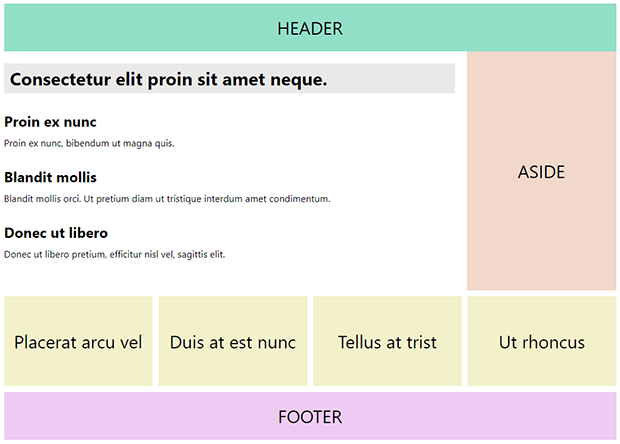
Xử lý thay đổi dữ liệu trong component
Ta sẽ sử dụng setState thay đổi dữ liệu của ItemList.
Trước tiên ta cần tạo button để thực hiện hành động thay đổi, và tạo dữ liệu thay đổi bên trong setState, ta tiến hành như sau:
/src/App.js
import React, { Component } from 'react';
import './App.css';
import Header from './components/Header';
import Headline from './components/Headline';
import ItemList from './components/ItemList';
import Aside from './components/Aside';
import BoxList from './components/BoxList';
import Footer from './components/Footer';
class App extends Component {
  constructor(props){
    super(props);
    this.state = blog;
  };
  render() {
    return (
      <div id="layout">
        <Header />
        <main>
          <section id="content">
            <Headline bigTitle={this.state.bigTitle} />
            <ItemList itemList={this.state.itemList} />
            <button type="button" onClick={this.changeItem}>Change Data</button>
          </section>
          <Aside />
          <BoxList boxList={this.state.boxList} />
        </main>
        <Footer />
      </div>
    );
  };
  changeItem = () => {
    this.setState({
      itemList: [
        {
          title: 'Title changed',
          info: 'Proin ex nunc, bibendum ut magna quis.'
        },
        {
          title: 'Blandit mollis',
          info: 'New information changed.'
        },
        {
          title: 'Donec ut libero',
          info: 'Donec ut libero pretium, efficitur nisl vel, sagittis elit.'
        }
      ]
    });
  };
};
const blog = {
  bigTitle: 'Consectetur elit proin sit amet neque.',
  itemList: [
    {
      title: 'Proin ex nunc',
      info: 'Proin ex nunc, bibendum ut magna quis.'
    },
    {
      title: 'Blandit mollis',
      info: 'Blandit mollis orci. Ut pretium diam ut tristique interdum amet condimentum.'
    },
    {
      title: 'Donec ut libero',
      info: 'Donec ut libero pretium, efficitur nisl vel, sagittis elit.'
    }
  ],
  boxList: [
    'Placerat arcu vel',
    'Duis at est nunc',
    'Tellus at trist',
    'Ut rhoncus'
  ]
};
export default App;
Vậy là xong rồi đó, chạy lại trình duyệt, click vào button ta sẽ thấy được dữ liệu mới sẽ được cập nhật như trong hình.
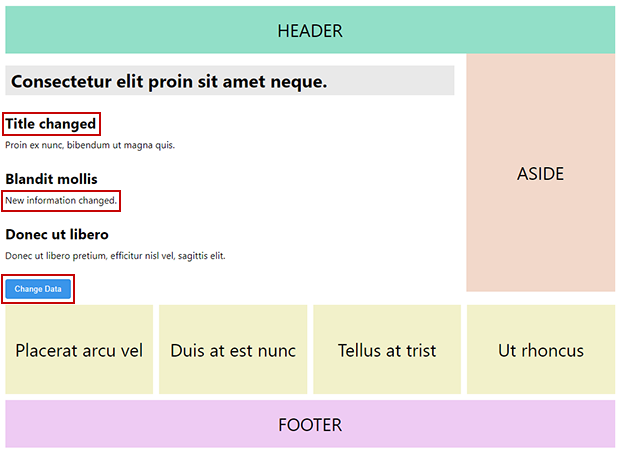
- Tới đây các bạn đã biết thao tác cho một project React như thế nào rồi he: add một template mẫu vào project và thực hiện các thao tác dữ liệu đơn giản như: view, update.
- Những nội dung tiếp theo sẽ giúp các bạn thực hiện một bộ project hoàn chỉnh: view, insert, view detail, update, delete từ một dữ liệu thực tế.